
The different levels of coding with AI — and how to find yours
In 2025, Andrej Karpathy put a name to something many of us were already doing: Vibe Coding. Instead of writing code line by line, one describes the intent to the AI in natural language, accepts what it generates, and keeps moving. Collins named it Word of the Year 2025. The world applauded.
Like in football there are local leagues, national leagues, and top-flight divisions — each with its own level of demand — AI development also has stages. Using AI to complete a single line is not the same as directing it to build a full feature from a specification. Where you start matters, and so does the journey.
The stages
Not everyone uses AI the same way. There is a clear progression, from the most basic assistance to full autonomy:
Level 0 — Autocomplete with flavor: The AI suggests the next line as you type. GitHub Copilot at its simplest. You still write 100% of the architecture and logic.
Level 1 — Code intern: The AI handles discrete, small tasks: writing a function, refactoring a module, generating a test. You review every line before accepting.
Level 2 — Junior with judgment: The AI can now make changes across multiple files and understands dependencies between modules. You still read everything, but spend more time reviewing than writing.
Level 3 — You as the manager: You direct at the feature or pull request level. You tell it what to build, not how. You review the behavior and high-level logic, not the code line by line.
Level 4 — You as the product manager: You write detailed specifications and let the AI build the entire feature. Validation is done through testing and behavior, not manual code review.
Beyond level 4, there is what some call the autonomous factory — systems where AI generates, tests, and deploys without human intervention. This article does not go there, but that is where the field is heading.
Why levels 1 through 4 are the sweet spot
There is a temptation to jump to the extreme — or to reckless Vibe Coding — because it sounds efficient. But production software has too many nuances that only human context can catch: business logic, security, UX decisions that are not in any document.
The range between level 1 and level 4 is not a comfort zone — it is where the highest volume of quality software is being built today. The progression is real and cumulative:
- Level 1: You gain speed on specific tasks without risking the whole.
- Level 2: The AI starts understanding your codebase, not just isolated snippets.
- Level 3: You delegate full features. You shift from writing to directing.
- Level 4: You define the what precisely. The AI builds the how. Review is functional, not line by line.
A real-world example (Level 3 — Architecture Decision):
- You provide context: "We have a monolith struggling under video processing load. I want to evaluate splitting it out as a microservice."
- The AI proposes options: A quick comparison of pros and cons: message queues (RabbitMQ/SQS), serverless functions, or a separate Golang service.
- You decide: "Let's go with SQS to avoid overcomplicating the current infrastructure."
- The AI implements: Generates the boilerplate for the queue, processing workers, and Terraform scripts.
- You review: Verifies that AWS role permissions make sense and adjusts error handling before testing in the dev environment.
Constant ping-pong. Not too loose, not too rigid.
Feeding the Tool: Documentation and "Skills"
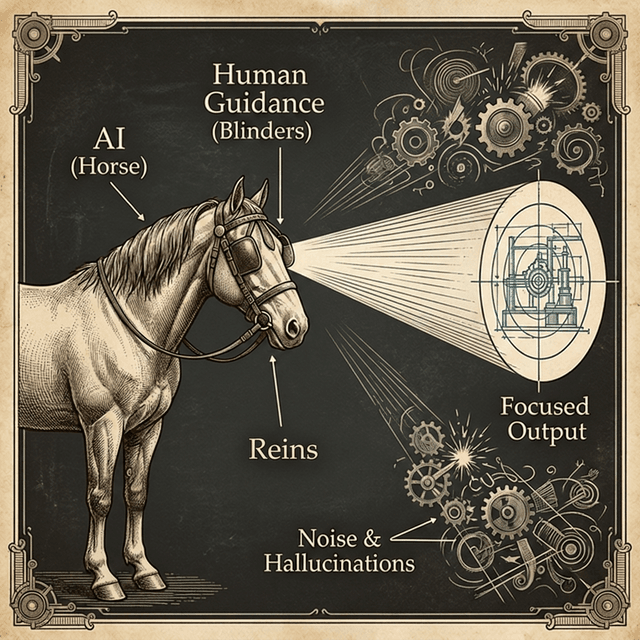
For moving between levels successfully, the AI needs real context about your project — and that context does not come on its own. Models have a training cutoff date: it is not that their knowledge expires, it is that new things appeared afterward and the model never saw them. If you are using recent tools (like TanStack Start RC or Expo SDK 55), it is your responsibility to bring it up to speed.
Read the documentation
Before asking an agent (Claude, GPT-5.2, whichever you use) to solve a problem with a recent library, point it to the Release Notes or updated documentation. An informed AI does not hallucinate — it follows the standard you just injected. It is the equivalent of telling a junior: "Read this 2026 guide before touching anything here."
Permanent context with "Skills"
Modern agentic IDEs (Cursor, Windsurf) support the concept of Skills: .md files where you define the rules of the game for your repository. When you integrate a Major Release or a highly opinionated pattern, spend 15 minutes writing a Skill.
The next time the agent touches the code, it will read that Skill, immediately detect the context, and write code aligned to the standard you set — not the one from a few years ago.
Tips for moving up a level
- Start by asking it for unit tests or documentation before delegating critical tasks. That is pure level 1.
- Don't let go of the wheel just yet: Always review what it generates. Human judgment is what defines the level.
- Refine the responses: The first suggestion is rarely perfect — that is also part of the work.
- Scale gradually: When you feel comfortable reviewing full features, you are ready for level 3. When you can specify with precision, level 4.
In summary
Working with AI is not black or white. There is a spectrum, and each level gives you a different degree of control. The key is consciously choosing where to operate based on what the project needs.
Levels 1 through 4 are not the easy path — they are the smart path.

That said: there are teams already operating in the autonomous factory. But just like there are those who free solo a cliff face and those who climb with ropes and gear — both are valid climbers — reaching that level without setting everything on fire requires skills and context most people are still building.
This article was written and reviewed with AI assistance, and the illustrations were generated with AI — which is itself a demonstration of the workflow it describes.