
Every developer has that one project. The one where you convince yourself you're solving a real problem, dive into the rabbit hole, build something genuinely interesting — and then discover the problem was already solved. The difference this time: thanks to AI, it wasn't weeks. It was days. Still counts as that story.
The Problem (That I Thought I Had)
The workflow between AI agents and UI design is broken. When an AI agent builds a UI, it writes code blind. It can't see the design. It can't verify that what it generates actually looks like what was intended.
My inspiration was Pencil.dev — a proprietary tool that bridges this gap by letting AI agents interact with designs visually. The idea was compelling: AI designs → Screenshot → AI codes. Human reviews → Notes → AI iterates.
But Pencil is closed source and subscription-based. The inevitable question: what if I built the open-source version?
I Built Sand 🏖️
Sand is an AI-native design editor where designs render actual React components — not vector approximations. What you see in the canvas is literally what gets built.
It lives at github.com/kno-raziel/sand-canvas.
The Core Idea
Most design tools (Figma, Sketch) use vector primitives. You draw a "button" but it's just a rectangle with rounded corners. Sand flips this: components are the primitive. Drop a daisyUI Button onto the canvas and you're looking at the real React component, rendered in a browser, with all its theme tokens applied.
This matters for AI because screenshots of real components are higher fidelity inputs for code generation.
How It Works
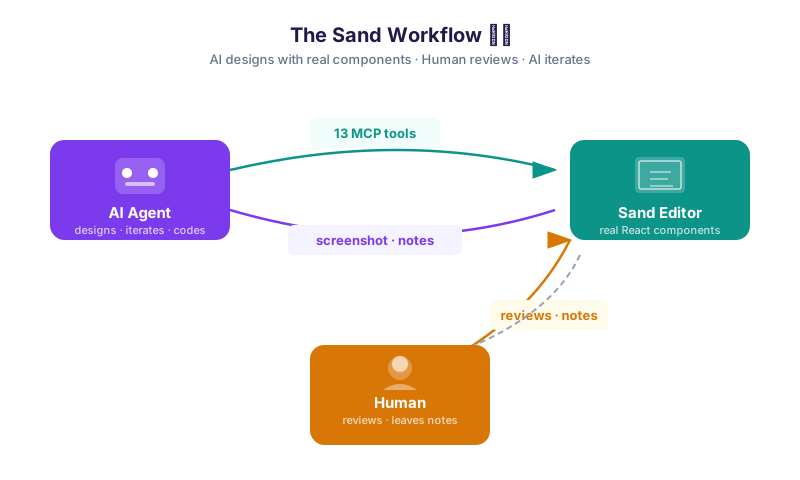
AI agents control Sand through 13 MCP (Model Context Protocol) tools:
| Tool | What it does |
|---|---|
batch_design | Insert, update, delete, copy nodes on the canvas |
batch_get | Read the document structure |
get_screenshot | Capture a PNG of any node |
open_document | Load .sand files |
get_variables / set_variables | Manage design tokens and themes |
reply_conversation | Respond to human comments on the canvas |
| …and 7 more | Layout analysis, find empty space, bulk edits |
What I Built
- Real component rendering — daisyUI 5 adapter with 30+ components
- Flexbox auto-layout — gap, padding, alignment,
fill_containersizing - Themes & Variables — design tokens with multi-theme dark/light support
- Responsive breakpoints — Desktop / Tablet / Mobile screens side by side
- Notes & comments — threaded conversations for the human ↔ agent loop
.sandfile format — plain JSON, Zod-validated, Git-friendly- Undo/Redo — full history with Immer patches
The Adapter System
One of my favorite design decisions: the adapter pattern. Any React component library can be plugged in. The daisyUI adapter uses a CSS-Class Engine — components are ~10 lines of declarative data:
{
  name: "Button",
  element: "button",
  baseClass: "btn",
  modifiers: {
    variant: { prefix: "btn-", values: ["primary", "secondary", "accent"] },
    size: { prefix: "btn-", values: ["xs", "sm", "md", "lg"] },
  },
  content: "label",
}
The engine auto-generates Zod schemas, defaults, and render functions from this spec. Adding a new component is a 10-minute task.
Here's Sand with the coffee landing page demo:


So… Why Storybook?
The honest answer: Storybook already solved this — and I already had it in the monorepo.
On closer inspection, the monorepo already included Storybook as a standalone app (apps/storybook) — not just for testing, but as a living component catalog where every story, co-located alongside its component in packages/design-system, is interactive documentation with real props, variants, and examples.
And it turns out Storybook has its own official MCP server (@storybook/addon-mcp). That changes everything:
| Storybook MCP Feature | What it enables |
|---|---|
| Component discovery | Agent lists all available components with props and variants |
| Code generation from stories | Agent suggests the right component based on a description |
| Live story previews | Agent provides direct URLs to visually verify the UI |
| Interaction & accessibility testing | Agent runs tests, identifies failures, and proposes fixes |
| Documentation extraction | Types, defaults, and descriptions in LLM-friendly format |
The same workflow I built from scratch with Sand — agent sees components → exposes preview → writes code → human reviews — already existed, battle-tested, on top of infrastructure I already maintained.
A (meta and real) footnote: While writing this exact paragraph, my AI assistant attempted to add "Automated screenshots" to the table above. It was crossing features from an older community-built repository with the official one. It serves as irrefutable proof of the main point of this entire experiment: the loop needs a human at the end curating the result. AI proposes, the human in the loop verifies.
Sand has a fun emoji in the README. 🏖️
The Real Lesson: POCs Are Cheap Now
Here's where it gets interesting. With AI as the executor, turning an idea like Sand into working software took a few hours spread over 3 days (February 25–27) — something that without that assistance would have taken months. The remaining days were spent on demos, documentation, and publication prep.
This changes the economics of software. POCs that once required a dedicated team and months of runway can now be validated in days. The cost of being wrong dropped dramatically.
The Open Question
If AI makes custom tooling this cheap to build, a genuine question emerges for small studios and indie teams:
Why should a small studio pay for closed-source tools, when a team working with AI can build a workflow tailored to exactly how they work?
Not every team needs a Figma license. Not every workflow fits Storybook's model. With AI as a co-builder, teams can now afford to craft the tools that fit their own context — their stack, their language, their process. Tropicalized, as we say in Costa Rica: adapted to local conditions, not shipped from Silicon Valley assuming universal requirements.
Sand 🏖️ was the replacement — for Figma, for Pencil, for my personal workflow. The POC did exactly what a POC is supposed to do: fast, honest, disposable. It just turned out the answer was 'it already exists — and you already have it...'. And that, at the cost of AI time, came out cheap.
This article was written and reviewed with AI assistance, and part of the illustrations were generated with AI — which is itself a demonstration of the workflow it describes.